23 March, 2022

Anu Script Manager

Anu Script Manager   

Basically it is typing application those who are data entry in regional languages. It supports more than 5 Indian languages. 


22 March, 2022

Counter Ticket Cancellation/ Boarding Point Change


🚆Counter Ticket Services🚆


Counter Ticket Cancellation Procedure

  • Enter PNR Number, Train number along with Captcha.
  • Select check box to confirm that rules and procedure are read.
  • After click on submit an OTP will be sent on mobile number given at the time of booking, enter the received OTP and click submit.
  • After the OTP is validated PNR details will be displayed on the screen.
  • After verifying the details Click on ‘Cancel Ticket’ for full cancellation. Refund amount due will be displayed on the screen.
  • An SMS will be sent with PNR and refund details. Sample format: “Your PNR xxxxxxxxxx has been cancelled. Collect refund amt xxxxx from journey commencing station or nearby satellite PRS locations. Ref. Terms & conditions”
  • For tickets cancelled (including return journey tickets) before 24 hours of scheduled train departure time:
  • Refund of fare as permissible can be collected on submission of original PRS counter ticket from any PRS counter of Indian Railways upto 4 hours before the scheduled departure time of the train in case of confirmed tickets and upto thirty minutes before the scheduled departure time of train in case of RAC/waitlisted tickets.
  • For tickets cancelled (including return journey tickets) between 24 hours and upto 4 hours for the confirmed tickets and upto thirty minutes for RAC/waitlisted tickets before the scheduled departure time: Refund of cancelled PRS counter tickets through IRCTC website or 139 at present is permitted only at the journey commencing station or nearby satellite PRS locations by surrendering original journey ticket. Please check the convenience of collecting refund from journey commencing station before cancelling your ticket
  • During first two hours of the opening of PRS counters on the next day for the tickets for the trains whose scheduled departure as under:- time is (i) between 1801 hours and 0600 hours.
  • Upto 4 hours after the scheduled departure of the train during the working hours of PRS counters/current counters/special counters where cancellation is permitted round the clock on the tickets for the trains whose scheduled departure time is (i) between 0601 hours and 1800 hours.

Counter Ticket Cancellation Rules

  • This may be applicable only in case valid mobile number has been given at the time of booking.
  • Cancellation of tickets and refund of fare may be permitted for PRS counter tickets in normal circumstances only and not in case of late running of trains/cancellation of train etc.
  • Online cancellation shall be permitted only upto 4 hours before the scheduled departure of the train if ticket is fully confirmed.
  • Online cancellation shall be permitted only upto 30 minutes before the scheduled departure of the train if ticket is RAC/Waitlist.
  • For tickets cancelled (including return journey tickets) before 24 hours of scheduled train departure time:
  • Refund of fare as permissible can be collected on submission of original PRS counter ticket from any PRS counter of Indian Railways upto 4 hours before the scheduled departure time of the train in case of confirmed tickets and upto thirty minutes before the scheduled departure time of train in case of RAC/waitlisted tickets.

👉Counter Ticket Services👈


How to Copy OS (Operating System)


What is OS cloning?

The OS (system) cloning software, as its name implies, is to clone the original operating system from one disk to another storage device such as a hard disk drive (HDD), solid-state drive (SSD) or other external hard drives. Then you can obviate the need to reinstall OS from scratch, which can be a tedious process especially when the Windows activation keys are not available any longer.

How can I clone my operating system?

You can clone the Windows operating system with cloning software. This drive cloning tool allows you to migrate your operating system and applications to another hard drive without fresh installing again. 

What is disk cloning in Windows 10?

Disk cloning can copy all data including system-related files from the source disk to the destination disk. You may want to clone disk in Windows 10 due to various motivations.

📌 Pros

  • Cloning makes it easier and faster to move to the backup storage as you don’t need to reinstall OS or configure settings.
  • You can install the same operating system with custom data and configuration on multiple computers by cloning multiple storage devices.
  • Data of multiple computers can be easily managed and quickly restored in case of any corruption.
  • The cloning software isn’t needed to be installed on the other storage drive to use the backup.

📌 Cons

  • As it creates an exact copy of the storage drive, cloning takes too much space than other backup solutions.
  • You must have another storage drive to backup data, can’t make backups on the same drive.
  • Full cloning must be done to update any new changes (in most cases); differential or incremental backup isn’t possible.
  • Now that you know why you should use cloning software let’s see the following Windows cloning software.

21 March, 2022

BEST Demat Account In India


What is Demat Account?

Demat account is also known as a Dematerialized account. The primary use of Demat account is to hold shares and securities in electronic format. It helps you in online trading like buying or selling shares, or converting physical shares into electronic form.

What is the difference between trading account and Demat account?

A Demat account comes with a trading account linked to it, with unique login credentials. So, you will need to use the trading account for transacting and investing in stocks. Demant account holds all the purchased shares while trading account helps you sell and purchase the securities.

Which banks in India offer Demat account?

All large banks in India offer demat account. This includes SBI, PNB, ICICI Bank, HDFC Bank, Yes Bank, Axis Bank. Demat account is an account where you hold the shares of the company in electronic format. They are similar to a bank account but instead of keeping money, we keep shares, mutual funds, bonds, ETFs, etc. in demat account.

who is discount brokers?

A discount broker is technically someone who assists you in trading with the stock exchange and lets you buy or sell shares but at an immensely less brokerage amount as compared to the other stockbrokers.

20 March, 2022

HDD vs SDD


What is the difference between SSD vs HDD?

The basic difference between SSD and HDD is that Solid State Drive stores the data in integrated circuits and a Hard Disk Drive stores data magnetically, through spinning disks. They can also be compared in terms of their speed, adaptability, technical modernity, and user experience.


Why do SSD's read data faster than HDD's?

Traditional HDDs have dishes that rotates continuously to access the information you need. This results to a slower data reading especially if the data is not located continuously. On SSDs, this does not happen anymore as it uses different internal parts that can read data faster compared to HDDs.


What makes SSD's so powerful?

Techniques such as Log structured data formats that makes writes sequential, which SSD’s really prefer, have let us interface the system with the SSD in a really powerful way. This forced new things like garbage collection into the diskdrive world


Why are SSD's so expensive?

When SSDs were first available on the market, they were very expensive compared to traditional HDDs in a couple of ways: They started out at higher costs regardless of capacity, but also priced per megabyte or gigabyte.
Main SSD Types


2.5-inch SSD: This is a standard form factor for SSD that can fit the inside drive bay of most PCs or desktop computers. As most users replace the hard drives with SSDs, the 2.5-inch drive becomes a standard for all mechanical drives and SSDs. With 2.5-inch SSD, you don’t have to replace the connecting interface cables. And you can transit to a better performance drive with ease.


mSATA SSD: Compared with 2.5-inch form factor, this is a smaller one. The size of a mSATA SSD is about one-eight size of a 2.5-inch drive. It can be plugged into the mSATA socket on the motherboard of the computer. Generally speaking, mSATA drives are utilized in very thin and small devices or used as a secondary drive for desktops.


M.2 SSD: This is the smallest form factor for SSD, which as small as a stick of gum. M.2 SSDs can connect to the motherboard with the help of an M.2 socket. This kind of SSD is built for small tablets and ultra-books.


PCIe 4.0 NVME SSD: It describes the NVMe SSDs that support the PCIe 4.0 motherboard interface. The PCIe NVMe SSD offers higher input/output operations per second and consumes less power.

What does an SSD do for gaming?

If you install an SSD on a computer for playing games, the load times will be reduced sharply. This is because the data transfer speed of SSD is rather high. The SSD can also reduce hitching occurring when you open games. Given to that fact, plenty of users install SSD for gaming.


What is the drawback of SSD?

  • Cost. The primary disadvantage of using a SSD is its cost.
  • Storage Space. The storage space offered by a SSD is limited to certain values. The base storage capacity of a SSD is 128GB.
  • Availability. Considering the availability of a SSD, they are less abundant in the market. Comparing to a HDD, SSDs are harder to find and expensive piece of devices.
  • Lifespan. The flash memories those are used in SSDs are limited to certain number of writes. Because of this the lifecycles present in a SSD is limited.
  • Data Recovery. In the event of a data deletion on a SSD, it is almost impossible to recover the data back.

24 July, 2018

Counter Ticket Cancellation Procedure

https://www.operations.irctc.co.in/ctcan/SystemTktCanLogin.jsf

  1. Enter PNR Number, Train number along with Captcha.
  1. Select check box to confirm that rules and procedure are read.
  1. After click on submit an OTP will be sent on mobile number given at the time of booking, enter the received OTP and click submit.
  1. After the OTP is validated PNR details will be displayed on the screen.
  1. After verifying the details Click on ‘Cancel Ticket’ for full cancellation. Refund amount due will be displayed on the screen.
  1. An SMS will be sent with PNR and refund details. Sample format: “Your PNR xxxxxxxxxx has been cancelled. Collect refund amt xxxxx from journey commencing station or nearby satellite PRS locations. Ref. Terms & conditions”
  1. For tickets cancelled (including return journey tickets) before 24 hours of scheduled train departure time:
  • Refund of fare as permissible can be collected on submission of original PRS counter ticket from any PRS counter of Indian Railways upto 4 hours before the scheduled departure time of the train in case of confirmed tickets and upto thirty minutes before the scheduled departure time of train in case of RAC/waitlisted tickets.
  1. For tickets cancelled (including return journey tickets) between 24 hours and upto 4 hours for the confirmed tickets and upto thirty minutes for RAC/waitlisted tickets before the scheduled departure time: Refund of cancelled PRS counter tickets through IRCTC website or 139 at present is permitted only at the journey commencing station or nearby satellite PRS locations by surrendering original journey ticket. Please check the convenience of collecting refund from journey commencing station before cancelling your ticket
  • During first two hours of the opening of PRS counters on the next day for the tickets for the trains whose scheduled departure as under:- time is (i) between 1801 hours and 0600 hours.
  • Upto 4 hours after the scheduled departure of the train during the working hours of PRS counters/current counters/special counters where cancellation is permitted round the clock on the tickets for the trains whose scheduled departure time is (i) between 0601 hours and 1800 hours.
Counter Ticket Cancellation Rules
This may be applicable only in case valid mobile number has been given at the time of booking.
Cancellation of tickets and refund of fare may be permitted for PRS counter tickets in normal circumstances only and not in case of late running of trains/cancellation of train etc.
Online cancellation shall be permitted only upto 4 hours before the scheduled departure of the train if ticket is fully confirmed.
Online cancellation shall be permitted only upto 30 minutes before the scheduled departure of the train if ticket is RAC/Waitlist.
For tickets cancelled (including return journey tickets) before 24 hours of scheduled train departure time:
Refund of fare as permissible can be collected on submission of original PRS counter ticket from any PRS counter of Indian Railways upto 4 hours before the scheduled departure time of the train in case of confirmed tickets and upto thirty minutes before the scheduled departure time of train in case of RAC/waitlisted tickets.
For tickets cancelled (including return journey tickets) between 24 hours and upto 4 hours for the confirmed tickets and upto thirty minutes for RAC/waitlisted tickets before the scheduled departure time: Refund of cancelled PRS counter tickets through IRCTC website or 139 at present is permitted only at the journey commencing station or nearby satellite PRS locations by surrendering original journey ticket. Please check the convenience of collecting refund from journey commencing station before cancelling your ticket
During first two hours of the opening of PRS counters on the next day for the tickets for the trains whose scheduled departure as under:- time is (i) between 1801 hours and 0600 hours.
Upto 4 hours after the scheduled departure of the train during the working hours of PRS counters/current counters/special counters where cancellation is permitted round the clock on the tickets for the trains whose scheduled departure time is (i) between 0601 hours and 1800 hours.
Passenger details (Viz.name, age, gender, booking status, current status) and journey details will be displayed on the website.
Once the passenger confirms full cancellation of PNR will be done and PNR will be marked as Cancelled but not refunded in the system. Seat/berth will be released. Refund amount due will also be displayed to the passenger on website
All the privilege/duty pass/PTOs/complimentary pass tickets may be allowed to be cancelled through website. In the case of pass zero refund is permissible however, for validity of the pass for fresh booking the passenger shall approach the counter to get the pass re-validated by marking the same cancelled against the earlier booked tickets as per prescribed rule.
PTO’s tickets are issued on 1/3rd of the total basic fares and normal cancellation charge is applicable in these tickets also. Therefore in many cases ticket value on PTOs is less than the cancellation charges therefore passengers may or may not cancel the tickets therefore cancellation across IRCTC website may be allowed in the case of PTOs also.
x

TDR (Ticket Deposit Receipt) Rules

What is TDR ( IRCTC / Indian Railways Refund)?
TDR (Ticket Deposit Receipt)is process of claiming refund for the booked ticket from Indian Railways (IRCTC). The refund process will take at-least 60 days and more.

When I can submit TDR?
TDR filing Reason & Refund Eligibility as per Railway Refund Rules

Train Cancelled
If Train cancelled, Full Refund will be processed automatically in the same account through which the payment was made at the time of booking.

Train Late More Than 3 Hours and Passenger Not Travelled.
TDR shall be filed before the actual departure of the train for availing full refund

Difference Of Fare In Case proper Coach Not Attached and passenger has to travel in lower class
TDR shall be filed within 2 days of the date of issue of the certificate(excluding the day of issue of the certificate) and the original certificate (GC/EFT) issued by the ticket checking staff is to be sent through post to IRCTC.

AC Failure.
TDR shall be filed within 20 hours of actual arrival of the train at passenger’s destination and the original certificate (GC/EFT) issued by the ticket checking staff is to be sent through post to IRCTC.

Excess fare Charged BY TTE
TDR shall be filed upto 72 hours of actual arrival of the train at passenger’s destination and the original certificate (GC/EFT) issued by the ticket checking staff is to be sent through post to IRCTC.

Party Partially Travelled.
TDR shall be filed upto 72 hours of actual arrival of the train at passenger’s destination and the original certificate (GC/EFT) issued by the ticket checking staff is to be sent through post to IRCTC.

Passenger Not Travelled.
No refund of fare shall be admissible on the ticket having confirmed reservation in case ticket is not cancelled or TDR not filed online upto four hours before the scheduled departure of the train. No refund of fare shall be admissible on RAC etickets in case the ticket is not cancelled or TDR not filed online upto thirty minutes before the scheduled departure of the train.

Train Diverted And Passenger Not Travelled.
TDR shall be filed upto 72 hours of schedule departure of the train at passenger’s Boarding station.

Train Diverted And Train Not Touching Boarding Station.
TDR shall be filed upto 72 hours of schedule departure of the train at passenger’s Boarding station.

Train Diverted And Train Not Touching Destination Station.
TDR shall be filed upto 72 hours of schedule departure of the train at passenger’s Boarding station.

Passenger Not Travelled Due To Ticket In RAC After Chart Preparation.
No refund of fare shall be admissible on RAC etickets in case the ticket is not cancelled or TDR not filed online upto thirty minutes before the scheduled departure of the train.

Train Terminated Short Of Destination.
TDR shall be filed upto 72 hours of schedule arrival of the train at passenger’s destination and the original certificate (GC/EFT) issued by the ticket checking staff is to be sent through post to IRCTC.

Party Partially Confirmed/Waitlisted And Waitlisted Passengers Did Not Travel.
TDR shall be filed upto 72 hours of actual arrival of the train at passenger’s destination and the original certificate (GC/EFT) issued by the ticket checking staff is to be sent through post to IRCTC.

Party Partially Confirmed/Waitlisted And All Passengers Did Not Travel.
No refund shall be granted on reserved/RAC/waitlisted ticket if it is TDR filed after thirty minutes before scheduled departure of the train.

Party Could Not Cancel Because Chart Prepared At Originating Or Previous Remote Location.
No refund of fare shall be admissible on the ticket having confirmed reservation in case ticket is not cancelled or TDR not filed online upto four hours before the scheduled departure of the train. No refund of fare shall be admissible on RAC etickets in case the ticket is not cancelled or TDR not filed online upto thirty minutes before the scheduled departure of the train.

Change In Reservation Status From Confirmed To Waitlisted/Part Waitlisted/RAC After Chart Preparation.
No refund shall be granted on RAC ticket or waitlisted ticket after thirty minutes before the scheduled departure of the train.

After Charting No Room Provided.
TDR shall be filed within 3 hours of actual departure of the train at passengers Boarding station.

Difference Of Fare As Passenger Travelled In Lower Class.
TDR shall be filed within 2 Days of the date of issue of the certificate(excluding the day of issue of the certificate) and the original certificate (GC/EFT) issued by the ticket checking staff is to be sent through post to IRCTC.

Passenger Not Travelled.

How do I file a TDR for Train tickets booked through IRTCTC?
TDR Filing Details:

Login to your IRCTC Account.
Click to Booked Ticket History.
List of tickets where date of Journey has elapsed.
Select PNR for which TDR is to be filed and click "File TDR" Button.
Select the passenger name from the ticket details for claiming TDR refund.
Select the reason form list box or type the reason if you select others.
Click Submit Button.
If Selected "Other" option new text box will open.
Customer can fill the details of reason and then click Submit button.
Confirmation will be show for completing filing TDR.
If details are confirmed clik "OK" in alert window.
Your TDR has been Filed Successfully.
TDR Entry Confirmation page will be show PNR Number, Transanction ID, Reference number, TDR Status, Reason.
How do I file a TDR for tickets booked through Paytm / Makemytrip / Cleartrip / Yatra?
When your Train ticket booked through Paytm / Makemytrip / Cleartrip / Yatra, you can follow these procedure.

Login to your IRCTC Account.
Click to Booked Ticket History.
List of tickets where date of Journey has elapsed.
Select PNR for which TDR is to be filed and click "File TDR" Button.
Select the passenger name from the ticket details for claiming TDR refund.
Select the reason form list box or type the reason if you select others.
Click Submit Button.
If Selected "Other" option new text box will open.
Customer can fill the details of reason and then click Submit button.
Confirmation will be show for completing filing TDR.
If details are confirmed clik "OK" in alert window.
Your TDR has been Filed Successfully.
TDR Entry Confirmation page will be show PNR Number, Transanction ID, Reference number, TDR Status, Reason.
How much percentage of ticket price is refunded if passenger not traveled under TDR refund scheme in railways?
It depends on the reason you have filed for the TDR. For example:

Once you filed a TDR for "Train late than 3 hours and passenger not travelled", got return in around 45 days (Full Refund of reservation cost)
Once you filed a TDR for "Ticket converted from wait list to RAC and passenger not travel", got refund in 7 days (Full money refunded :-))
Once for "AC not working properly " provided by the TTE in train itself, still waiting for my return (almost 1 year).
Basically your TDR application requires the approval of zonal manager, it differs in time depending on your reason and yes sometimes your TDR gets rejected also.

What is EFT detail in filing IRCTC TDR?
Excess fare ticket (EFT) (in original) issued by the TTE is must to claim for refund. In case of wrongly charged by the TTE-full refund will be granted by the Chief Commercial Manager/Refunds. Excess fare ticket (EFT) (in original) issued by the TTE is must to claim for refund.

What is CR registered status in IRCTC TDR?
'CR' stands for "Claim Refund" which means you can obtain a refund of a ticket on a journey not taken. You could also check back on the TDR status from time to time. If it shows Admin Approved, it means that your case is eligible for a refund as approved by the IRCTC Corporate/IRCTC Zonal Office.

Suppose I am unable to approach the concerned authorities, what do I do?
In exceptional circumstances you may obtain a Ticket Deposit Receipt (TDR) from the nearest major station within 3 (Three) days from the day of scheduled travel. You must then submit an application in the prescribed form (Printed on the back of TDR) to the Chief Commercial Manager (Refunds) of the Zonal Railway to which the Ticket Deposit Receipt-issuing station belongs.

This application must be submitted within 10 (Ten) days from the date of your journey. The refund offi cer will examine the case on merit and, if decided, refund will be sent to you by a Station Pay Order (to be encashed at station) or Money Order or Crossed Cheque.

Ticket Deposit Receipt (TDR) Rules in case of I-Ticket:-
Online refund request is not allowed for i-ticket.

Customers are requested to surrender the I-Ticket with the Station Master and obtain a Ticket Deposit Receipt (TDR) within 30 days from the date of scheduled travel.
Send your claim for refund to the following address attaching the original copy of the TDR to:
GGM(IT),
Indian Railway Catering and Tourism Corporation Ltd.
1stFloor, Internet Ticketing Centre
IRCA Building, State Entry Road
New Delhi 110055.
The TDR Refund will be processed as per Extant Railway Rules:
IRCTC will forward the claim to Concerned Railways to process the refund and money of refund amount will be credited back to same account through which payment was made after receiving the same from the concerned Railways.
How long does it take to get IRCTC TDR refund?
The TDR Refund will be processed as per Extant Railway Rules. TDR should be filed before or within 30 minutes of the Departure of Train. The refund process will take at-least 60 days and more. E-ticket refund request (after chart preparation) can be filed online.

Ticket deposit receipt(TDR) Rules in case of E-Ticket:-
E-ticket refund request (after chart preparation) can be filed online.
The customers are requested to use the online TDR Filing & Status tracking service provided by IRCTC. Select the “File TDR” Link in the left panel under the “My Transactions” menu for filing TDR online IRCTC will forward the claim to Concerned Railways to process the refund and money of refund amount will be credited back to same account through which payment was made after receiving the same from the concerned Railways. In case of e-ticket the refund is processed by the Refund Office of the Zonal Railways in whose jurisdiction the destination station of the train falls.
Online File TDR option is not available for Agent. If ticket booked through Agent the refund request should routed through Agent only.
Whenever Agents received such a request from their customers they are required to send a mail to etickets@irctc.co.in containing following details.
Ticket Details:

PNR Number Transaction Id Train Number From To Date of Journey
1234567890 1000XXXXX 12345 NDLS BCT 01-Nov-2017
Passenger Details:

Sl No. Passenger Name Age Sex Reason for TDR
XX XXXXXX XXXXXX XX X XXXXXXXXXXXX
A part from above, the agent will give a declaration that he has obtained written request from the customer for refund. IRCTC will file TDR and forward the claim to Concerned Railways to process the refund and money of refund amount will be credited back to Agents account through which payment was made after receiving the same from the concerned Railways.

TDR Filing for Agent:-
The Authorized Agents of IRCTC cannot file TDRs online. They have to send a mail to IRCTC for filing TDR. The customers who have to claim refund against the tickets purchased through the Agents should approach to the concerned Agent for filing TDR. It should be kept in mind the Railways decide refund cases as per extent Railway Refund Rules. As such it should be ensure that the TDRs are filed within the prescribed time limits.

Whenever Agents receive such requests from their customers, they are required to send a mail to IRCTC at nominated e-mail id, provided by IRCTC through their registered e-mail id containing following details within prescribed time. If any TDR request is received at other than nominated email id or from other than registered e mail id, IRCTC shall not be entertain the same.

The agent will obtain written request from the customer for refund for record purpose as proof that the customer has preferred claim for refund.

The cases in which TDR are filed are decided by the Zonal Railway under whose jurisdiction the train destination falls. After receipt of the refund amount from the said Railway, refund amount will be credited back to same account of the Agent through which payment was made.

Procedure for Cancellation of E-Tickets

  • e-Tickets can be cancelled on Internet at this website till Chart preparation of the train .Cancellations are not allowed at face to face Railway Counters. If the user wishes to cancel his e-Ticket, he can do so till the time of chart preparation for the train.For train starting up to 12 noon the chart preparation is usually done on the previous night. He can log on to www.services.irctc.co.in and go to "Booked Tickets" link and select the ticket to be cancelled and can initiate the cancellation by selecting the passengers to be cancelled. Cancellation would be confirmed online and the refund would be credited back to the account used for booking as for normal Internet tickets. If there is any partial cancellation of ticket, please ensure that a fresh e-reservation slip (Electronic Reservation Slip) is printed separately as done for the original ticket. To take you step by step and familiarize you with the procedure for canceling of e-tickets. 
  • Cancellation of e-Tickets before chart preparation of the train:

    If a confirmed ticket is cancelled more than 48 hrs before the scheduled departure of the train, flat cancellation charges shall be deducted @ Rs.240/- for AC First Class/Executive Class, Rs.200/- for AC 2 Tier/First Class, Rs. 180 for AC 3 Tier/AC Chair car/ AC 3 Economy, Rs.120/- for Sleeper Class and Rs.60/- for Second Class. Cancellation charges are per passenger.

    If a confirmed ticket is cancelled within 48 hrs and up to 12 hours before the scheduled departure of the train, cancellation charges shall be 25% of the fare subject to the minimum flat rate mentioned in the above clause.

    Less than 12 hours and upto four hours before the scheduled departure of the train up to chart preparation which is earlier, 50% of the fare paid subject to the minimum cancellation charges. Note the Chart preparation time is the time for the chart preparation from the Train Originating Station or from the previous chart Preparation station.
  • Cancellation of e-Tickets after the preparation of Reservation charts:

    For Normal User:- E-ticket cannot be cancelled after chart preparation. Users are requested to use the online TDR filing for such cases and track Status of the refund case through tracking service provided by IRCTC. TDR can be filed as per Railway rules:
  • No refund of fare shall be admissible on the tickets having confirmed reservation in case the ticket is not cancelled or TDR not filed online upto four hours before the scheduled departure of the train.
  • No refund of fare shall be admissible on RAC e-tickets is case the ticket is not cancelled or TDR not filed online upto thirty minutes before the scheduled departure of the train.
  • In case, on a party e-ticket or a family e-ticket issued for travel of more than one passenger, some passengers have confirmed reservation and others are on RAC or waiting list, full refund of fare , less clerkage, shall be admissible for confirmed passengers also subject to the condition that the ticket shall be cancelled online or online TDR shall be filed for all the passengers upto thirty minutes before the scheduled departure of the train.

  • The online TDR shall be filed upto seventy two hours of actual arrival of the train at passenger’s destination and the original certificate issued by the ticket checking staff is to be sent through post to Indian Railway Catering and Tourism Corporation (IRCTC).
    For filing online TDR, select ""File Ticket Deposit Receipt (TDR)"" from menu ""Services"". For the ticket booked at old site, select ""Old Transaction History"" from menu ""My Transactions"" and after getting the password verified select ""File TDR"" link in the left panel under the "My Transactions" menu. IRCTC will forward the claim to Concerned Railways to process the refund and money of refund amount will be credited back to same account through which payment was made after receiving the same from the concerned Railways. For any other clarifications please mail to etickets@irctc.co.in

    For Agents :- E-ticket cannot be cancelled after chart preparation. Whenever Agents received such a request from their customers they are required to send a mail to etickets@irctc.co.in containing following details.
    PNR No.
    Transaction ID :
    Train No.
    From:
    To:
    Date of journey:
    S.No.
    PASSENGER NAME
    AGE
    SEX
    Reasons for Filing TDR
    IRCTC will file TDR and forward the claim to Concerned Railways to process the refund and money of refund amount will be credited back to Agents account through which payment was made after receiving the same from the concerned Railways. For any other clarifications please mail to etickets@irctc.co.in"
  • For Tatkal Tickets Booked as e-Tickets:

    No refund will be granted on cancellation of confirmed Tatkal tickets. For contingent cancellation and waitlisted Tatkal ticket cancellations, charges will be deducted as per existing Railway rules. Partial cancellation of Tatkal e-tickets is allowed.
  • Cancellation of e-tickets in case of trains cancelled:

    If the train is marked as "CANCELLED" in PRS due to breaches, floods, accidents etc. full refund is permissible in case the ticket is cancelled within three days of the scheduled departure of the train. In case of e-tickets, such cancellations can be done by the customer through Internet.

03 January, 2018

Link Aadhaar Number With Mobile Phone for Re-Verification Using IVR

HIGHLIGHTS

  • Subscribers need to dial 14546 from their phones
  • They will receive an OTP, which is needed for verification to be complete
  • Corporate customers do not need to link mobile number and Aadhaar
As the government continues its drive to re-verify the SIM cards using Aadhaar number, the process became a little easier on Tuesday. Now telecom subscribers can call a single number to verify all their mobile numbers with Aadhaar, irrespective of network. This brings in a sigh of relief for consumers across the country, who only had the option to visit offline stores run by their operators to link the two till now. Now, they can use the IVR service from their homes instead, cutting out the hassle involved in going to physical outlets.

How to link Aadhaar with mobile phone number

If you want to re-verify your phone number by linking it to Aadhaar, the process is rather simple. You just need to keep your Aadhaar number at hand. Whether you are on AirtelIdeaJio, and Vodafone or any other operator, you simply need to call the toll-free number 14546 from the phone number. Follow these steps, as directed by the IVR, to complete the re-verification process.
  1. When you call 14546, you will be asked to select whether you are an Indian national or an NRI by selecting the respective option
  2. Next, you will have to give consent to link Aadhaar with your phone number by pressing 1
  3. After that, you need to provide your Aadhaar number and press 1 to confirm
  4. This step generates the OTP, which you will receive on your mobile phone
  5. Now, you need to enter your phone number
  6. Here, you are asked to give consent to your operator to pick your name, photo and date of birth from UIDAI data base
  7. The IVR now mentions the last four digits of your number to confirm that you have keyed in the right number
  8. If the number is correct, you can enter the OTP you received on SMS
  9. You must press 1 to complete the Aadhaar-mobile number re-verification process
  10. If you hold another phone number, you can link that too by pressing 2 and following the steps provided by the IVR system. Keep your other mobile phone handy as you will receive the OTP on this number.
The OTP you receive for Aadhaar-mobile phone re-verification is valid for 30 minutes, so you can use it even there is some network glitch and the call terminates prematurely. The IVR system says the last date to link the two is February 6. Subscribers who are on corporate plans do not need to need to undergo the re-verification process.
So far, Airtel, Idea, and Vodafone have activated the service. Upon calling Jio, the IVR tried to direct us to a customer care executive, but both times the call was terminated without reaching an executive. 
In late November, telecom operators had also been directed to set up a website so that subscribers can link Aadhaar and mobile number online. However, there is no such website so far. Going by the image in a tweet by the Digital India Twitter account, it seems users will be able to link the two using the mAadhaar app, which is available only for Android so far, as well in some time.

15 December, 2017

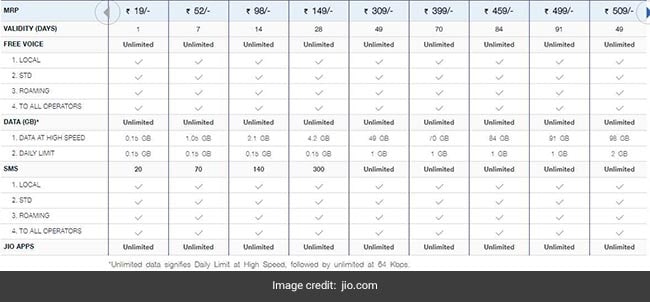
Jio Prepaid Plans Updated 15th Dec 2017

Reliance Jio prepaid recharge plan at Rs 19

This prepaid recharge plan of Jio offers high speed data at 0.15 GB or gigabytes. The daily 4G data limit is also 0.15GB. Local, STD and roaming SMSes (short message service) allowed across all operators are 20 in number, said Jio on its website. This prepaid recharge plan of Jio is valid for one day.


Reliance Jio prepaid recharge plan at Rs 52

This prepaid recharge plan of Jio offers high speed data of 1.05GB. The daily 4G data limit is 0.15GB. Local, STD and roaming SMSes allowed across all operators are 70 in number. This prepaid recharge plan of Jio is valid for seven days.


Reliance Jio prepaid recharge plan at Rs 98

This prepaid recharge plan of Jio offers high speed data of 2.1GB. The daily 4G data limit is 0.15GB. This prepaid recharge plan of Jio offers 140 local, STD and roaming SMSes across all operators, said Jio. This prepaid recharge plan of Jio is valid for 14 days.


Reliance Jio prepaid recharge plan at Rs 149

This prepaid recharge plan of Jio offers high speed data of 4.2GB. The daily 4G data limit is 0.15GB. This prepaid recharge plan of Jio offers 300 local, STD and roaming SMSes across all operators. This prepaid recharge plan of Jio is valid for 28 days.


Reliance Jio prepaid recharge plan at Rs 309

This prepaid recharge plan of Jio offers high speed data of 49GB. The daily 4G data limit is 1GB. Local, STD and roaming SMSes offered in this prepaid recharge plan of Jio are unlimited. This prepaid recharge plan of Jio is valid for 49 days.


Reliance Jio prepaid recharge plan at Rs 399

This prepaid recharge plan of Jio offers high speed data of 70GB. The daily 4G data limit is 1GB. Unlimited local, STD and roaming SMSes are offered across all operators, in this prepaid recharge plan, according to Jio's website. This prepaid recharge plan of Jio is valid for 70 days.


Reliance Jio prepaid recharge plan at Rs 459

This prepaid recharge plan of Jio offers high speed data of 84GB. The daily 4G data limit is 1GB. This plan also offers unlimited local, STD and roaming SMSes across all operators. This prepaid recharge plan of Jio is valid for 84 days.


Reliance Jio prepaid recharge plan at Rs 499

This prepaid recharge plan of Jio offers high speed data of 91GB. The daily 4G data limit is 1GB. Unlimited local, STD and roaming SMSes are offered in this prepaid recharge plan, across all operators. This prepaid recharge plan of Jio is valid for 91 days.


Reliance Jio prepaid recharge plan at Rs 509

This prepaid recharge plan of Jio offers high speed data of 98GB. The daily 4G data limit is 2GB. The number of SMS - local, STD and on roaming - offered is unlimited, across all operators. This prepaid recharge plan of Jio is valid for 49 days.


Reliance Jio prepaid recharge plan at Rs 799

This prepaid recharge plan of Jio offers high speed data of 84GB. The daily 4G data limit is 3GB. The number of SMS - local, STD and on roaming - offered is unlimited, across all operators. This prepaid recharge plan of Jio is valid for 28 days.


Reliance Jio prepaid recharge plan at Rs 999

This prepaid recharge plan of Jio offers high speed data of 60GB. There is no daily data limit. Unlimited local, STD and roaming SMSes are offered in this prepaid recharge plan, across all operators. This prepaid recharge plan of Jio is valid for 90 days.

08 December, 2017

BSNL Prepaid Recharge Plans: Rs 429 Vs Rs 339 Vs Rs 444 Vs Rs 333

BSNL's Rs 429 prepaid recharge plan

  • This BSNL prepaid recharge plan offers freebies of 1GB data per day as well as unlimited local and STD calls to any network, said BSNL on its website, portal2.bsnl.in. The freebies are valid for 90 days but the plan comes with a validity of 180 days.
  • BSNL's Rs 339 data STV

    This STV by BSNL offers 3GB data per day without any speed restrictions, according to BSNL's website. It comes bundled with unlimited local and STD calls  from BSNL to BSNL. If one wants to make a call from BSNL to any other network, he/she will get 30 minutes every day free of charge. Off-net voice calls will be charged at 25 paise per minute after the 30 minute/day freebie is over. This BSNL STV is valid for 26 days.
  • BSNL Rs 444 Chauka STV

    This prepaid data plan, called as BSNL Chauka_ 444 STV, offers unlimited data for 90 days. However, internet speed will reduce to 80 Kbps after 2GB per day.
  • BSNL data STV for Rs 333

    This prepaid data STV by BSNL also offers unlimited data for 56 days. However, internet speed will reduce to 80 Kbps after exhaustion of 1GB per day. 

07 December, 2017

Flipkart Sale Offers

Flipkart Big Shopping Days sale is here, and will run till Saturday, December 9. Under this sale, Flipkartwill offer a host of deals across popular products, including mobiles, tablets, TVs, laptops, as well as other electronics.
SBI credit card users can get an additional 10 percent discount (up to Rs. 1,600 on a minimum cart value of Rs. 4,999) during the Flipkart sale. On top of these are exchange discounts, buyback guarantees, no-cost EMIs, etc.

  • Google Pixel 2 64GB
    Google Pixel 2 has received its first major discount with this sale, even though it is barely a month old. Google is selling the smartphone at a discounted price of Rs. 49,999 (MRP Rs. 61,000) during the Big Shopping Days sale. That's not all, you can get an additional discount of Rs. 10,000 by making a payment using any debit or credit card, and another discount of up to Rs. 18,000 by changing your old device. 
    Price: Rs. 49,999 (MRP Rs. 61,000)


  • Google Pixel 2 XL The Google Pixel 2 XL is also getting a discount, even though it's not as sweet as the Pixel 2, it's still a great deal. The Pixel 2 XL is available for Rs. 67,999 (MRP Rs. 73,000) on Flipkart for a limited time. You can get an additional discount of up to Rs. 18,000 on exchanging your old smartphone, and even get another Rs. 3,000 in exchange value on select smartphones. On paying with any debit or credit card you get an additional Rs. 8,000 off. The Google Pixel 2 XL features a 6-inch QHD+ display and is powered by the Qualcomm Snapdragon 835 chipset, supported by 4GB of RAM. It includes a 12.2-megapixel primary camera and an 8-megapixel front-facing camera.
  • Price: Rs. 67,999 (MRP Rs. 73,000)

Apple iPhone 8 Plus 64GB
The Apple iPhone 8 Plus 64GB is down to Rs. 68,999 (MRP Rs. 73,000) on Flipkart's Big Shopping Days sale. You can get another Rs. 1,600 off if you pay with an SBI credit card. The company is also bundling a buyback guarantee for an additional Rs. 99, which promises an exchange value of Rs. 35,000 when you exchange the iPhone 8 Plus 64GB on its website later on. The iPhone 8 Plus features a 5.5-inch Retina HD display and is powered by Apple's A11 Bionic chip. It includes a dual camera setup featuring two 12-megapixel cameras and a 7-megapixel front-facing camera.

  • Apple iPhone 7 32GB
    Apple iPhone 7 32GB is down to Rs. 39,999 (MRP Rs. 49,000) on Flipkart. You can get an additional Rs. 1,600 off if you pay using an SBI credit card. There's an exchange offer that promises another discount of up to Rs. 18,000 on your purchase. The iPhone 7 features a 4.7-inch Retina HD Display and a water-resistant body. It includes a 12-megapixel primary camera and a 7-megapixel front-facing camera, and is powered by Apple's A10 processor.
  • Honor 9i 64GB
    The Honor 9i 64GB has received a discount of Rs. 2,000 in Flipkart's Big Shopping Days sale. The phone is now available for Rs. 17,999 (MRP Rs. 19,999) this weekend. Exchanging the smartphone with your old phone with further sweeten the deal by up to Rs. 17,000 off. The Honor 9i features a 5.9-inch full HD display and is powered by the Huawei 659 chipset, supported by 4GB of RAM. It includes a dual camera setup both at the back as well as the front. The primary camera includes a 16-megapixel camera and a 2-megapixel camera while the front-facing dual camera setup is made up of a 13-megapixel and a 2-megapixel camera.
  • Sony Bravia 40-inch full HD smart LED TV
    The Sony Bravia 40-inch full HD smart LED TV is down to Rs. 42,999 (MRP Rs. 51,900), and Flipkart is offering an additional discount of up to Rs. 12,000 if you exchange your old television set. The LED TV comes with support for two HDMI ports and two USB ports. There's a built-in subwoofer that promises a good sound experience for most customers. You can connect the Sony Bravia LED TV to the internet using a wired or a wireless connection to access apps like Netflix, YouTube, and others.
  • MSI GV series gaming laptop
    The MSI GV Series gaming laptop GV62 is down to Rs. 54,990 (MRP Rs. 79,990) on Flipkart for Big Shopping Days sale. The laptop is powered by seventh-generation Intel Core i7 processor, supported by 8GB of RAM. It comes with a 1TB hard drive and includes the Nvidia GeForce GTX 1050 graphics card with 4GB of RAM. The laptop ships with a 15.6-inch display. It doesn't come with any pre-installed operating system though.

02 December, 2017

How to book TATKAL tickets super fast below 60 seconds

Today discuss about how to book Tatkal super fast

  • My last post getting super response about ticket booking.
  • Now, it is more simple
  • Just note down. 
  • Use Google Chrome web browse (Desktop / Laptop) 
  • Clear web past history as well as cookies. 
  • Restart web browser
  • Clear all addons
Usually we get 10am A/C classes & 11am Sleepar class all know this.
  1. Fill form using link below. 
  2. Fillup and Click Save and Bookmark that page using Ctrl +B


  • Use fastest networks like JIO, Airtel 4g.
  • Login IRCTC portal at (if A/c 09:58, Sleepar 10:58)
  • Enter from and to station codes, select date

  • Here one thing, we book tatkal tickets journey before day. But, But.. All trains will never start same day (your journey day) 
  • What i am saying is not your journey date. Its train starting date. It may be one day or two days before also your journey date. 
  • For Exxample, i want to book ticket from ANAKAPALLE to Chennai (Dhanbad Alappuzha Express 13351) 
  • Today is Saturday. I want ticket for Sunday. I am going to book TATKAL ticket 11am. But it shows NA or REGRET. 
  • Because the train departure origin station is Saturday. Its big miatake. 
These are the silly mistakes
  • And click on search button. Time now (09:59/ 10:59)
  • Click on Tatkal and choose your train (1, 2, 3 A/c or Sleepar) 
  • It shows availability chart. 
  • Never refresh your Browser/ Multi Login / Mobile App login strictly Prohibited. 
  • Never click, availability for repeated times. 10 clicks available for one tatkal session 
  • If, 10/11 am, click on availability, Click booknow
  • Click on the bookmark 
  • It fill our data, type Capcha Without mistakes, then click next
  • In payment gateway 
Choose PayTM / Mobikwik
In that payment sites, Choose Low usage banks like, UNION BANK, CORPORATION BANK, BANK OF INDIA like that
Fill fast, and get your dream journey ticket below 60 seconds. 

Iam challenge you get it if your tension free. Have a nice day. Bye. 


Honor 7X to go on sale in India on 7 December


much-awaited Honor 7X smartphone will be officially available in India from 7 December. The dual-camera smartphone will go on sale at Amazon India at 12 pm

buyers will get a 5.93-inch full HD+ display with an octa-core Kirin 659 inside. The SoC is paired with 4 GB RAM and will be available in 32/64/128 GB internal storage variants (expandable).


16 MP+ 2MP camera setup on the rear while the front camera gets an 8 MP sensor. The device packs in a 3,340mAh battery and comes with dual SIM support for 4G networks

Key Specs

Screen Size5.93-inch
Resolution1080x2160 pixels
Storage32GB
Processor1.7GHz octa-core
RAM4GB
Rear Camera16-megapixel
Front Camera8-megapixel
OSAndroid 7.0
Battery Capacity3340mAh

Huawei Honor 7X detailed specifications

GENERAL

Release dateOctober 2017
Form factorTouchscreen
Dimensions (mm)156.50 75.30 7.60
Weight (g)165.00
Battery capacity (mAh)3340
Removable batteryNo
ColoursBlack, Blue, Gold

DISPLAY

Screen size (inches)5.93
TouchscreenYes
Resolution1080x2160 pixels

HARDWARE

Processor1.7GHz octa-core
Processor makeHiSilicon Kirin 659
RAM4GB
Internal storage32GB
Expandable storageYes
Expandable storage typemicroSD
Expandable storage up to (GB)256

CAMERA

Rear camera16-megapixel
Rear FlashYes
Front camera8-megapixel

SOFTWARE

Operating SystemAndroid 7.0
SkinEMUI 5.1

CONNECTIVITY

Wi-FiYes
GPSYes
BluetoothYes
NFCNo
InfraredNo
USB OTGYes
FMNo
Number of SIMs2
SIM 1
SIM TypeNano-SIM
GSM/CDMAGSM
3GYes
4G/ LTEYes
Supports 4G in India (Band 40)No
SIM 2
SIM TypeNano-SIM
GSM/CDMAGSM
3GYes
4G/ LTEYes
Supports 4G in India (Band 40)No

SENSORS

Compass/ MagnetometerYes
Proximity sensorYes
AccelerometerYes
Ambient light sensorYes
GyroscopeYes
BarometerNo
Temperature sensorNo
Registration for 1st flash sale on Dec 7th

Anu Script Manager

Anu Script Manager      Basically it is typing application those who are data entry in regional languages. It supports more than 5 Indian la...